A sleep mask with speakers and a headband with speakers can play the same podcast, yet feel very different on your pillow. Start with what you want around your eyes and ears, then look at the controls, charging routine and care instructions. This guide helps you choose and set up LC-dolida sleep headphones for the way you actually rest.
Start with your usual resting position
Think about the first ten minutes after you lie down. Do you rest on your back, turn onto one side, or change position several times? A product can feel pleasant when you are sitting upright and feel different once your ear meets a pillow. The position of the speaker matters as much as the softness of the surrounding fabric. A small adjustment can move a hard edge away from the part of your ear that bears weight.
For a side-resting fit, put the mask or headband on before tightening it. Lie down on your usual pillow and find the speaker through the fabric. Move it gently until it lines up with your ear. You are aiming for clear, quiet audio without pulling the entire band too tight. Check both sides even if you normally favor one. The mask should stay in place when you turn your head, but it should not need an uncomfortable amount of tension.
Your pillow, hair and preferred position all affect the result. Treat a side-sleeper description as a design intention, not a promise that one shape will suit every person. If the speaker feels uncomfortable, change its position or stop wearing the product. Adding volume does not solve a poor fit.
Choose a mask, a headband or a bonnet
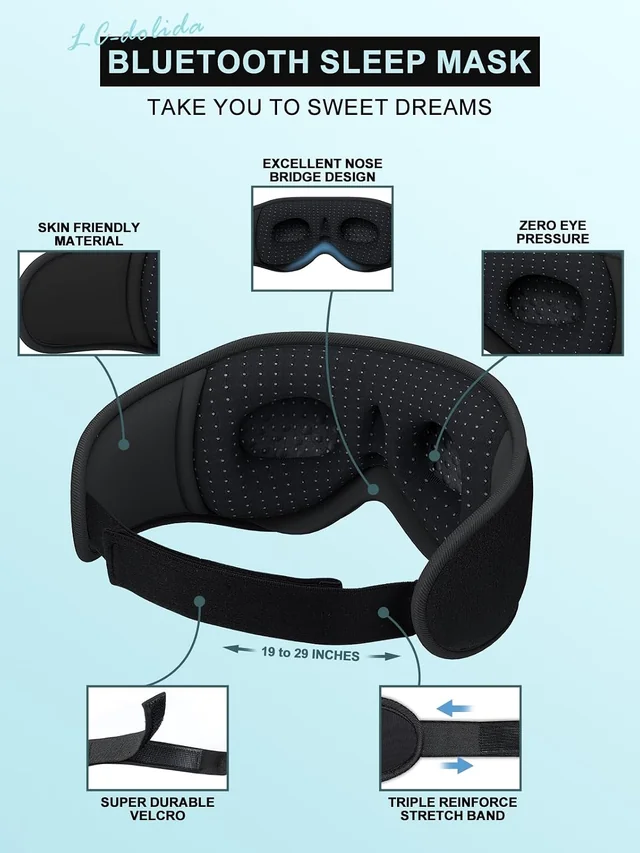
A Bluetooth sleep mask combines eye coverage with speakers. It is the most direct choice when you want to reduce light around your eyes while listening. Contoured models leave space in front of the eyelids, while a broader wraparound style places more fabric around the temples. Look at photographs of the inside as well as the front. The interior reveals the eye-cup shape, nose opening and strap arrangement that you will actually feel.
A Bluetooth headband is useful when you want audio with your eyes uncovered. It can also fit into a quiet daytime routine, such as listening while stretching or doing household tasks. Position it so the speakers meet your ears and the controls remain easy to find. A headband can be pulled lower, but that does not give it the same shaped eye space as a contoured mask. Choose the form for your main use rather than expecting every form to behave identically.
A Bluetooth bonnet adds a roomy hair covering. Our Pink Leopard option has an elastic opening and integrated speakers. Think about how much room your hairstyle needs and how the elastic feels where it meets your skin. It has a different shape and purpose from a compact eye mask. Compare the sleep masks, headbands and bonnet before choosing.
Look closely at eye space and light coverage
The 3D Bluetooth Sleep Mask and White Noise Bluetooth Sleep Mask have shaped eye cups. These create a recess around the eye area rather than laying the whole front surface flat across the eyelids. The Ice Silk model uses a broader, cushioned wraparound shape. Neither appearance alone can tell you how the nose area will sit on your face, so take time to adjust the position before deciding whether the fit works.
Try the mask in the room where you plan to use it. Begin with the strap loose, center the nose opening and then tighten gradually. If light enters near the nose, a small upward or downward change may help. Pulling the strap much tighter can create pressure without fixing the gap. Check that the top edge does not push against your eyebrows and that the lower edge feels comfortable on your cheeks.
Eye coverage and audio are separate functions. You can use a mask for darkness without playing anything, and you can listen without trying to achieve complete darkness. Decide which matters most in your routine. An office nap, a bright bedroom and an airplane seat present different light conditions, so judge the fit in a realistic setting.
Understand Bluetooth and built-in sounds
Bluetooth mode plays audio from a paired device. That gives you control over the music, audiobook, podcast or sound app you already use. The headphones are the listening device; they do not provide every audio service themselves. Check the requirements of your chosen app, including whether it needs an internet connection, a subscription or a downloaded file. Having the right track ready can make the evening routine simpler.
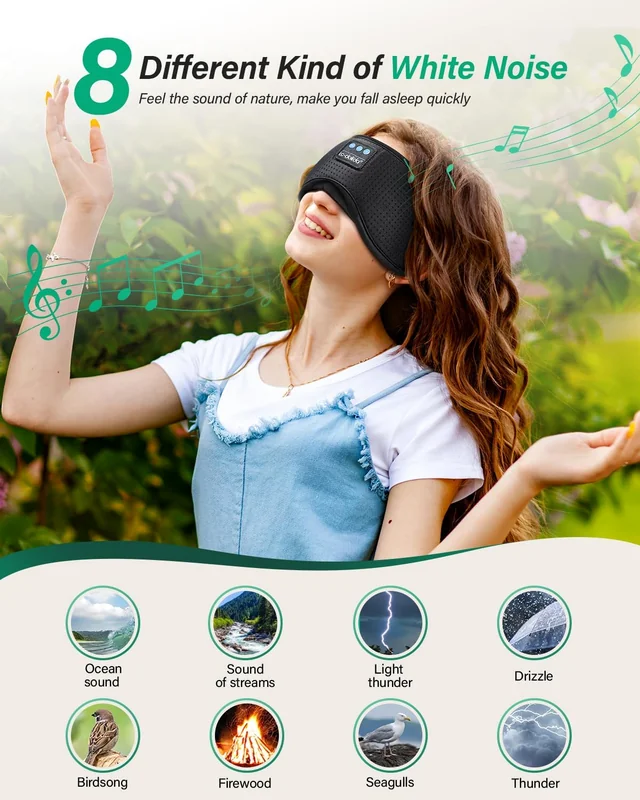
The LC003 White Noise Bluetooth Sleep Mask also offers eight built-in sound choices. Those sounds can play without connecting a phone. This is useful when you want a simple sound option without opening an app. It is a specific feature of that model. A Bluetooth connection on another mask or headband does not automatically mean that it includes stored sound tracks.
Choose between these approaches by considering your habits. If you change podcasts each evening, phone audio may be your priority. If you prefer a familiar sound and want fewer steps, built-in playback may be useful. Check the controls and included instructions for switching modes, because buttons can perform different actions depending on whether you press, hold or repeat a press.
Separate listening, masking and noise cancellation
Playing a steady sound can make other sounds less noticeable. That experience is different from active noise cancellation, which uses microphones and electronic processing to reduce incoming sound. The fabric sleep headphones in this selection are presented as listening products. Do not choose them on the assumption that they will electronically cancel a partner's snoring, street noise or a nearby conversation.
Think about the sounds you still need to notice. An alarm, someone calling your name or another important sound may be less noticeable while audio is playing. Test your normal setup while you are awake, including the volume and position of your phone. If being able to hear your surroundings is essential, adjust the routine accordingly. Raising the playback level to overpower a noisy room is not a substitute for choosing a suitable environment.
Competitor formats also differ. Manta SOUND combines an eye mask with speakers. SleepPhones Wireless uses a headband. Ozlo Sleepbuds sit inside the ears. Compare the wearing format and its limitations before comparing headline specifications. These products are not interchangeable simply because all are marketed for nighttime listening.
Set up the connection before bedtime
Make the first connection while you have good light and time to read the controls. Charge the product as instructed, disconnect it from the charging cable, and turn it on. Open Bluetooth settings on the device you want to use and look for the name given in the included manual. Confirm the connection, then play a familiar spoken recording at a low starting volume. Speech makes it easier to check whether both speakers are positioned correctly.
If the product does not appear in the device list, check that it is powered on and in the appropriate pairing state. Another nearby device may have already connected to it. Review the saved Bluetooth connections on that device and disconnect there before trying again. The included manual should guide any reset or re-pairing procedure; do not assume that every LC-dolida model uses the same button sequence.
Once connected, test play, pause and volume while you can see the control panel. Learn which buttons use a short press and which use a longer hold. This is easier than experimenting after the lights are off. Keep the phone within a practical distance and avoid assuming that a stated maximum wireless range applies through every wall or across every room.
Place the speakers before adjusting volume
Thin speakers still need to sit in the right place. If the sound is faint on one side, first check alignment. The speaker can be slightly above, below or behind the ear even when the headband itself looks centered. Move the speaker gently within its fabric pocket if the model permits adjustment. Avoid tugging on the wires or twisting the control module to reach a better position.
After adjusting, listen to a familiar voice again. Bring the volume up only as far as you need for comfortable listening. A quiet room may need a very different setting from a busy room. If you alternate between spoken audio and music, remember that recordings can have different loudness levels even when the volume control has not moved.
Repeat the fit check after turning onto your side. A speaker may move as the fabric shifts against the pillow. If the band repeatedly slips, adjust its placement and tension rather than treating more volume as the answer. Keeping the fabric smooth around the speaker can also prevent a folded seam from becoming the part you feel against your ear.
Decide when you want playback to stop
Some people want one chapter or a short settling-in period. Others prefer a longer sound track. A timer can make that choice explicit. The LC003 White Noise model includes timing options between 30 and 120 minutes. Use its own instructions to select and confirm the setting. The built-in timer belongs to that model and should not be assumed for every Bluetooth mask or headband.
For phone-based playback, your audio app may offer a sleep timer of its own. Check whether it stops the current track, ends at a chapter boundary or pauses after a fixed duration. Test the result during the day. A timer that pauses an app is not necessarily the same as turning off the headphones, and background notifications may still follow the phone's settings.
Set up notifications thoughtfully before resting. Keep any alerts you need and check the behavior of the exact device and app combination you use. The aim is a predictable routine: the right audio starts, the controls behave as expected, and playback stops when you intended. A quick daytime test is more useful than relying on an unfamiliar icon at bedtime.
Compare battery claims in context
Battery figures describe a product under particular conditions. Playback volume, connection behavior and the age of the battery can change how long it lasts in your routine. Battery capacity and playback time differ across the range. The 3D mask lists eight to ten hours, while the Ice Silk mask lists up to fifteen hours. These are stated specifications, not a guarantee of the same result for every listener.
Do not compare charging time and playback time as if they were the same measure. A product that takes around two hours to charge does not necessarily have the same runtime as another with a similar charging period. Check the connector and charging instructions that arrive with your exact model. Keep the charging connection dry and inspect the cable and port before use.
A practical routine is to check the battery before you need the product, rather than discovering a low charge once you are already in bed. Disconnect it from charging before wearing it. If the device or battery becomes damaged, unusually hot or otherwise behaves unexpectedly, stop using it and consult the supplied product instructions or the seller's support options.
Choose the feel, then check the care label
Material names can describe a surface feel as well as a fiber. For example, “Ice Silk” is used as a product name in this range; it should not be read as a guarantee that the entire mask is natural silk. Look at the exact product description and care label for composition and cleaning guidance. The firmness of the padding, depth of the eye cups and smoothness of the seams also contribute to how a mask feels.
A stretch headband has less shaped structure than a contoured mask. That can suit someone who wants a flexible band across the forehead, but it offers a different fit. A bonnet surrounds more hair and has its own elastic opening. Think about warmth, the amount of fabric you prefer and whether you want your eyes covered. Photographs showing the product worn can help you understand proportions, but individual fit will still vary.
Keep the first fit test short and unhurried. Check the edges around the nose, temples and ears, then try your normal resting position. A product that needs repeated uncomfortable adjustments may not be the right shape for you. Review the available return options in the purchase tab before ordering if you are uncertain about the fit.
Remove electronics before washing
Fabric and electronics need different care. Where the model is designed for washing, remove the control module, speakers and wiring as instructed before the fabric gets wet. A washable headband does not mean that the assembled headphones can be submerged. Find the openings first and work gently so that a connector or wire does not snag inside the material.
Follow the care label for water temperature, detergent and washing method. Do not transfer instructions from one mask to another simply because both carry the same brand name. A model with shaped padding or a different outer fabric may need different handling. Keep the electronic components in a clean, dry place while you clean the fabric portion.
Allow the fabric to dry completely before reassembly. Check the speaker pockets and seams as well as the outer surface. Reinsert the parts in their original orientation without forcing them, then test the controls and sound while you are awake. If a speaker feels misplaced afterward, adjust it before wearing the product on a pillow. Regular care should preserve both the fabric shape and easy access to the controls.
Plan for travel and daytime rest
For a trip, choose a shape that works with the seat or pillow you expect to use. A broad mask may feel different when you are sitting upright than when you are lying down. Test the strap with any glasses, hairstyle or travel pillow that might affect placement. Pack the product so the control panel is not pressed continuously by other items in your bag.
Download any audio you need before departure if your app allows it. A Bluetooth connection between the headphones and phone does not itself require mobile data, but streaming content can. Check the travel provider's rules for electronic devices and keep necessary announcements audible. Do not assume a product's light coverage or audio makes it appropriate for every situation.
For a short daytime break, prepare the audio and timer before putting the mask on. Keep the routine easy to reverse when you need to return to your surroundings. At home, a headband may suit listening with your eyes uncovered; on a bright journey, an eye mask may be more relevant. Choose around the actual setting instead of treating travel as a single use case.
Make your final choice
Start with three questions: Do you want your eyes covered? Do you prefer shaped eye cups or a broader cushioned surface? Do you want built-in sounds or audio from your own device? These answers narrow the choice more effectively than comparing every specification at once. Then check the selected color, charging instructions and care method on the product page.
Use the gallery to inspect the inner shape and control placement. Read the model's specific battery information, remembering that actual use varies. If a specification is not stated for the model, do not borrow it from a similar-looking product. The same care applies to accessories: confirm what is included in the offer you select.
Our displayed prices are checked snapshots. The purchase tab shows the current offer, available options, delivery information and return terms before you place an order. Once the product arrives, make time for a daytime fit, pairing and playback test. Start with the LC-dolida collection, or use our setup and care help when you have a practical question.